A List of Odd Projects I Did This Year That Don’t (Yet) Have Dedicated Blog Posts
I started Midwest Frontier AI Consulting in August 2025. I have been writing on my company blog since August 20, 2025 about different AI-related content and since September 13, 2025, I’ve been writing on Substack specifically about AI and Law.
I started Midwest Frontier AI Consulting in August 2025. I have been writing on my company blog since August 20, 2025 about different AI-related content and since September 13, 2025, I’ve been writing on Substack specifically about AI and Law.
I have described a variety of projects, including:
But there are many other projects I did not write about this year.
Misc. Projects, Tests, and Quick Things I Tried in 2025
I spend a lot of time talking about the risks of generative AI, not because I categorically dislike genAI, but because it’s an important technology and to use it responsibly we need to understand the risks.
I don’t always talk about the cool, interesting, and useful things you can do with it. So consider this a catch-up post. Some of these projects were quick and may not warrant a full write-up. Others will get a blog post at a later date, but will be included in this year-end list.
Local AI Models
AI models that run on your own computer.
You can use Chroma and local LLMs to make your documents searchable with semantic search.
This can simply provide the files with the best similarity score to the user’s query.
Or, you can have retrieval augmented generation (RAG), with a chatbot using your documents for context but also generating responses. RAG can help mitigate AI hallucinations, but does not limit them.
I am doing a lot of experimenting with vector search, RAG setups, and local LLMs that I haven’t written about in much detail yet. On recent project involved using Chroma and ollama to build RAG on top of my blog posts for the year (on my device, this is not a live feature on my website).
You can quickly bulk transcribe audio files, such as podcast episodes, with Parakeet, which runs locally on-device.
I was able to transcribe at a rate of about 1-2 minutes per hour of audio on a Mac mini that is a few years old. This is substantially faster than Whisper. I tested on nearly 500 audio files, running for over 16 hours. The quality of transcription was good, but did not label speakers.
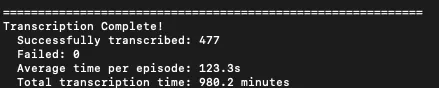
Image and Video Generation
You can use ChatGPT for image generation.
In my opinion, ChatGPT is still much better than Google Gemini for text-to-image generation, while I prefer Gemini for editing or transforming reference images). But if you don’t provide specifics in your prompts, you might end up with that generic “ChatGPT comic strip cartoon” style.
Google Gemini’s image generation can generate and read coherent it’s own writing (even other languages).
This one surprised me. I got Gemini to generate an image with a line of famous Arabic poetry. Then, I used that image as an input in a new chat to create a video in Veo 3. Gemini correctly “read” the poem from the image. Previously, I have had mixed results with generative AI generating images with Arabic text and I had little success in generative AI interpreting other AI-generated text within images.
Text within AI-generated images has improved significantly since last year.
You can write a “Title card” and have Google’s Veo 3 generate a short scene.
First, I tried this myself. Then my 1st-grader wanted to try it. Despite his handwriting and some spelling errors, Gemini generated the scene correctly.
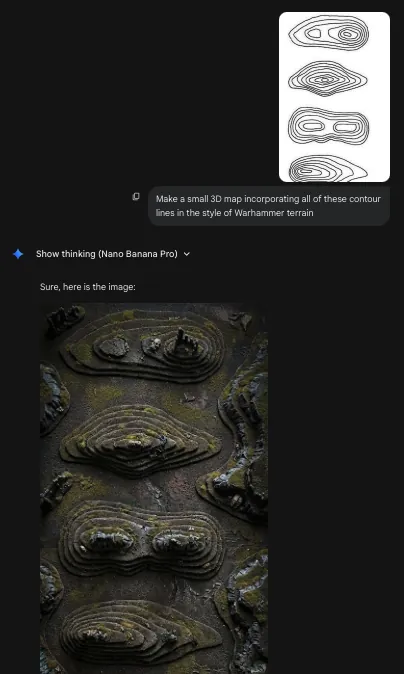
You can draw topographic / contour lines and have Google Gemini generate images with them.
This one was based on a random hunch I had while looking at mapping Twitter. I drew contour lines on a piece of paper, snapped a picture, and threw that into Gemini. I asked for various scenes like a tropical island, a Warhammer miniatures scene, and realistic 3D mountain scenery.
You can animate a piece of art with Google’s Veo 3.
If you take a picture of a drawing, painting, or collage you’ve done, you can animate it.
Synthetic Data Generation
You can generate synthetic data using the Prompts to create unique data methodology.
While my original explanation of the Verbalized Sampling paper used the example of kids’ jokes, it can also be used for creating non-existent-yet-correctly-formatted data, which is also useful for long-term Doppelgänger Hallucination testing.
Create synthetic data for Arabic regional dialects.
Both ChatGPT (GPT-5) and Claude (Sonnet-4.5) did a surprisingly good job simulating answers to a questionnaire to identify different words for things in Arabic dialects, based on city and simulated background (more specific than just country-level dialects).
Quickly Build Software for My Own Use
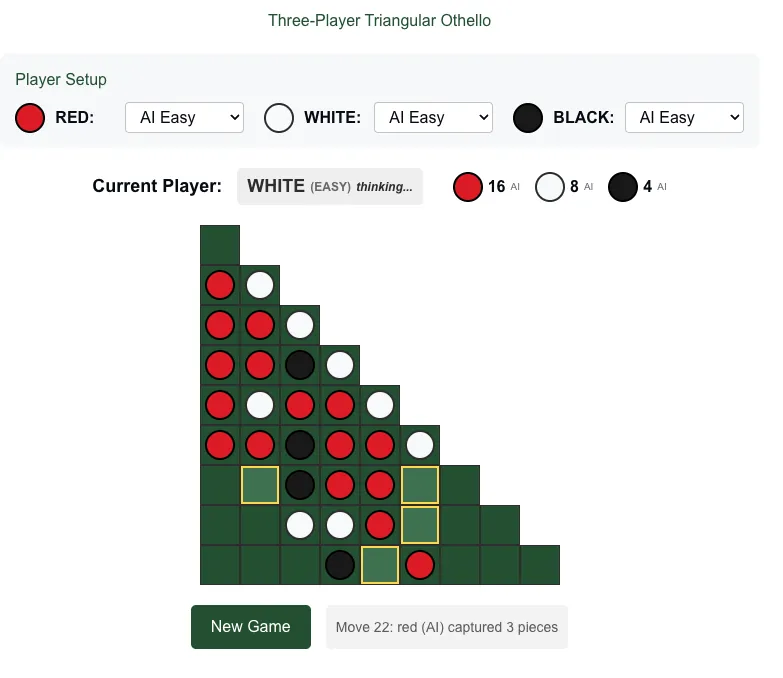
You can use Claude to build playable games with Artifacts.
My kids and I play board games a lot. Sometimes I try out ideas with Claude Artifacts. One idea that got a lot of use was when I made a three-player version of Reversi I came up with to play with my sons.
You can use Claude Code to write entire programs, clean up old code, or organize files and documents.
I have mainly been using Claude Code to organize and improve my website with customize themes and layouts, and improve features like the map of AI cases.
However, as powerful as Claude Code is, it is also important to use GitHub or something similar for version control. It is also critical to make sure Claude is changing code but not your actual writing.
I’ll likely be using Claude Code more in the coming year and writing more about my thinking around it. But I will also be explaining my concerns about automation bias related to Claude Code and similar coding tools.
Create a weekly meal planning app for only my family’s exact needs.
Another beauty of Claude Artifacts. The program included my own recipes and I had Claude add and change features to my heart’s content. The program only had to work for me. Once created, the program itself didn’t use AI.
Learning and Teaching My Kids
ChatGPT Can Make Sight Word Flashcards for Kids
I use two programs for flashcards for my kids: Anki and Hashcards. Both are based on spaced-repetition. I can ask ChatGPT to make sight word cards formatted for either Anki or Hashcards, which saves a ton of time.
I can tell ChatGPT to add more words to the list. I can tell ChatGPT to make the words age appropriate for age or grade or reading proficiency level. I can target the words to a certain topic like Minecraft or Star Wars or birds or dinosaurs.
If you kid has written down sight words they want to practice, you can take a picture of that, tell ChatGPT to transcribe it, and turn that into flashcards in the Anki or Hashcards format. My son had rotated the paper and written in four different directions, had some backward or misshapen letters, and had some misspellings, yet ChatGPT successfully transcribed all of the words. And that was before GPT-5.
K2 Think is good at explaining math concepts and thinking about numbers.
K2 Think is a math-focused LLM from the United Arab Emirates (not to be confused with the similarly named Chinese Kimi K2 Thinking model). While LLMs can sometimes make baffling mathematical mistakes (e.g., “which is larger, 9.11 or 9.9?”), K2 Think is very effective at rephrasing math concepts for a target audience.
I would recommend K2 Think (k2think.ai) for parents as an option to help explain math homework to kids. It is also helpful contextualizing anything involving very large numbers or hard to understand numbers.
However, I would caution against any “teaching yourself with AI” because if you are learning new material you may not be able to identify hallucinations. Drilling on fake information can be worse than not knowing the material at all. And harder to fix later.
Create realistic conversations in multilingual post-colonial contexts, like Franco-Lingala of D.R. Congo or the French-infused Arabic of Morocco or Tunisia.
LLMs even seem capable of recognizing, correctly, that Tunisians would use a heavier mix of French than Moroccans.
I’ve currently been learning some Lingala from a friend, and he’s been consistently surprised at how generally accurate Claude and ChatGPT are at suggesting the right mix of French words with Lingala for natural-sounding speech.
Fact-Checking or Catching Errors
You can use Google Gemini to fact-check maps…with caveats.
I used Gemini to look at the Wikipedia map of U.S. Federal Court District, which incorrectly misses the fact that the District of Wyoming includes the Yellowstone National Park parts of Idaho and Montana. Gemini caught the Yellowstone error, but it also hallucinated an additional error (that was not actually present). Gemini said that “Connecticut is colored as part of the 1st Circuit, but it actually belongs to the 2nd Circuit.” If Connecticut were colored part of the 1st Circuit, that would have been an error, but in fact the map had Connecticut correctly colored as the 2nd Circuit already.
Basically, Gemini could be helpful as a second check to catch things a human reviewer might miss, but it is not reliable enough on its own to be the only check. And if a human reviewer accepted everything it said, it may also not work well because of hallucinations. So for now I think the best use is a hybrid model with a knowledgeable human expert getting some quick feedback from an AI for improved accuracy.
If an image was generated using Google Gemini, you could search for it on Google Gemini to find the SynthID.
If you think an image you saw on social media may have been generated with AI, you can go on Google Gemini and ask it. It can search for a watermark called “SynthID” that shows the image was generated or edited with Google AI. However, images can be edited to remove the watermark, so a negative response does not necessarily mean the image is “real.” Additionally, this does not generally work with images edited with other AI tools, e.g., if you ask Google but the image is from ChatGPT.
It is especially important to note that this is specifically about a watermarking feature that Google added to image outputs. It is not a general principle about all AI outputs for all AI models. For example, you can’t just put a student’s paper into ChatGPT, ask if the paper was generated by ChatGPT, and get a valid response.
K2 Think is good at sanity checks for numbers.
For example, there was a recent controversy about a statistic in the book Empire of AI. Andy Masley noted that the per capita water usage rates for a Peruvian city were implausibly low (this error appears to have been from the original source and not Karen Hao, the author of Empire of Water, who corrected this when it was brought to her attention). Masley gave an example from South Africa of 50 L/person for an extremely low water rationing situation, and noted that the Peruvian stats implied much less, likely due to a unit error mixing up liters and meters cubed.
When I entered the numbers from Hao’s tweet showing the numbers from the primary source in Peru, K2 Think also stated that this was below a same issue as a likely liters/cubic meters mix-up. Bottom line: you could potentially use a model like K2 Think as a “sanity check” for very large numbers to potentially spot errors like this.